
Start with the right expectation
The archive preserves tender information and document packages that can become difficult to find after a tender closes. It helps citizens compare specifications, dates, departments, values, updates, and available bid-stage evidence.
- Search by subject, tender ID, reference number, department, organisation chain, location, or pincode where those fields exist.
- Open the structured tender page before downloading documents. It gives you a quick map of dates, values, authority details, and available evidence links.
- Use the archived documents for careful reading, but verify consequential conclusions against the government source and the latest corrigenda.
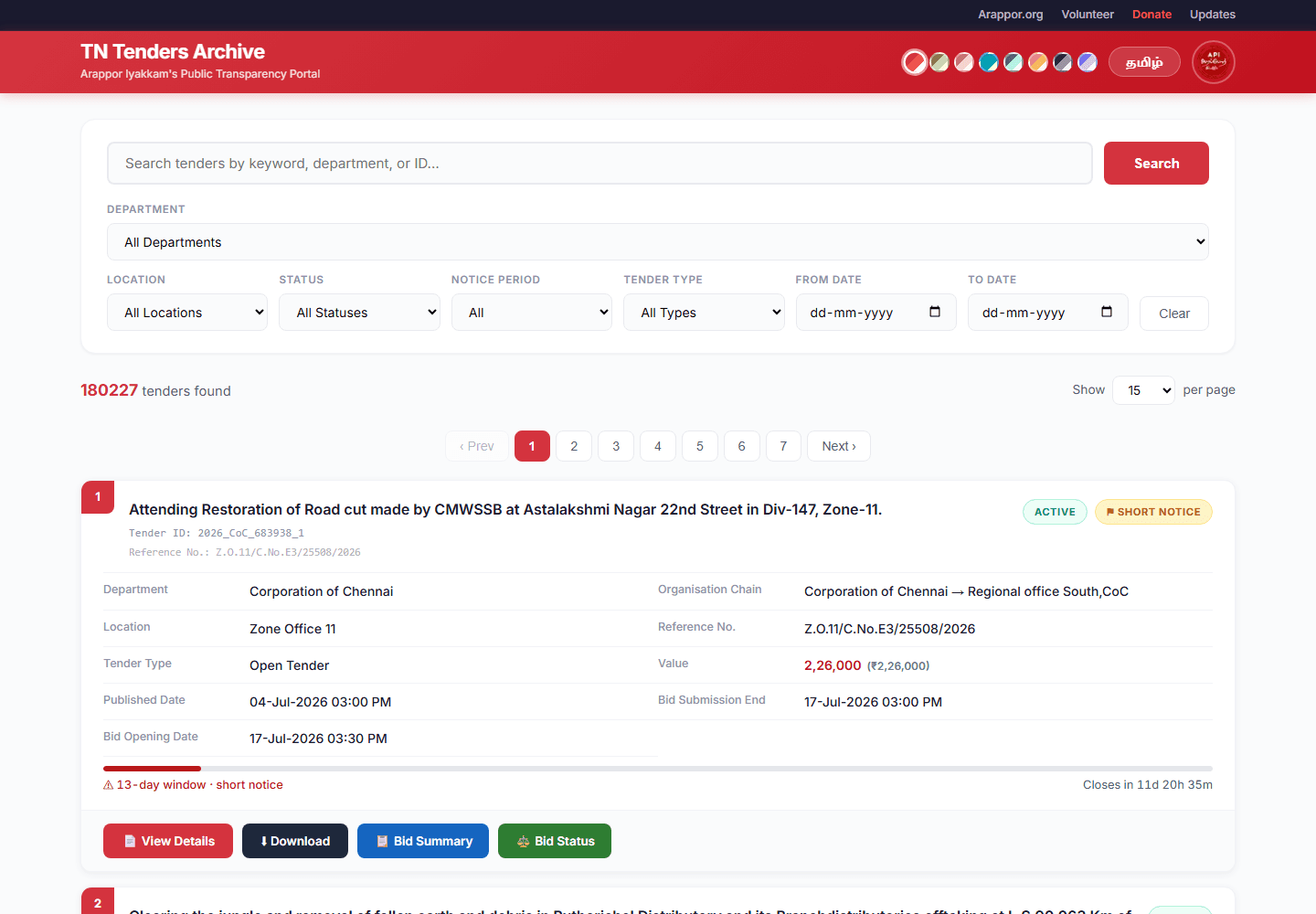
- 1Keyword search
Enter a subject, tender ID, reference number, department, location, or pincode and press Search.
- 2Filters
Narrow the result by department, location, status, notice period, type, or publication date.
- 3Result count
Shows how many records match all selected filters before pagination is applied.
- 4Tender badges
Summarise lifecycle, notice length, updates, and legacy status; their exact rules are listed below.
- 5Evidence actions
Open the structured record, archive download, or available official bid-stage pages.
Find the tender you need
Keyword search and filters can be used together. Keyword search checks several text fields with OR logic; the separate filters are then combined with AND logic.
Example: searching “storm water” looks for those words across the searchable text fields. Selecting a department and a date range then narrows that result to records matching both selections.
The result count represents all matching records. The page-size control changes only how many are shown at once; it does not change the search.
| Feature availability | Current tenders | Legacy archive |
|---|---|---|
| Keyword searchSearches title, tender ID, reference number, department, organisation chain, and captured location fields. | Available | Available for title, ID, reference, and department; location terms are unreliable. |
| DepartmentReturns records whose stored procuring organisation exactly matches the selected department. | Available | Generally available. |
| LocationFilters on the structured location captured from the current tender record. | Available when disclosed | Usually unavailable in the historical import. |
| StatusUses source exceptions and the submission/opening deadline. Active intentionally excludes legacy records. | Available | Finalized and exceptional historical states can be found when usable dates/status exist. |
| Notice periodShort Notice is evaluated only for enriched non-legacy tenders. The exact window runs from Published Date to Bid Submission End, with Closing Date used only when the submission deadline is unavailable. Known values below Rs.10 crore require 15 complete days. Missing, zero, or unusable values use the same 15-day baseline. Exactly Rs.10 crore and higher values require 30 complete days. | Available when publication and deadline dates are usable; a usable tender value is not required for the 15-day baseline. | Not evaluated or labelled for legacy tenders. |
| Tender typeMatches the source tender type, such as Open Tender or Limited Tender. | Available when disclosed | Usually unavailable. |
| Publication date rangeFrom and To apply to the tender publication date, not the closing or opening date. | Available | Available when a valid historical publication date exists. |
Read the card before opening the tender
A tender card combines the most useful identifiers, timing information, warning labels, and available evidence actions. A missing field or button means it was not captured for that record.
The tender is not marked cancelled, retendered, or withdrawn, and its applicable deadline is still in the future.
- How it is calculated
- Bid submission end is used first; bid opening/closing is the fallback.
- What it does not mean
- It does not guarantee that every bidder can participate or that the government portal has no additional restrictions.
The applicable bid submission or opening deadline has passed.
- How it is calculated
- Current time is on or after the stored deadline.
- What it does not mean
- It does not mean that a winner was selected, an AOC was published, or the work was completed.
The source tender status identifies the procurement as cancelled.
- How it is calculated
- Taken from the stored government-source status.
- What it does not mean
- Read the cancellation notice or corrigendum for the reason.
The source identifies the procurement as issued again.
- How it is calculated
- Taken from the stored government-source status.
- What it does not mean
- The replacement may use a different tender ID and must be searched separately.
The procuring authority withdrew the tender.
- How it is calculated
- Taken from the stored government-source status.
- What it does not mean
- It is different from a tender whose submission window merely ended.
The available status and date fields are insufficient for a reliable lifecycle label.
- How it is calculated
- Used only when the normal status rules cannot be applied.
- What it does not mean
- It is a data limitation, not a tender outcome.
The exact bidding window is shorter than the notice period applied to this non-legacy tender.
- How it is calculated
- Non-legacy tenders only. Published Date to Bid Submission End, with Closing-date fallback: under 15 complete days for known values below Rs.10 crore; the same 15-day baseline when value is missing, zero, or unusable (unavailable); under 30 complete days when value is exactly Rs.10 crore or higher.
- What it does not mean
- Even a one-hour shortfall is flagged. Legacy tenders are not evaluated, and tenders without usable publication/deadline dates receive no label. This is a screening signal for closer reading, not a legal conclusion or an allegation of corruption.
The archive detected more than one file/version or at least one corrigendum.
- How it is calculated
- Archived file count > 1 OR recorded corrigendum count > 0.
- What it does not mean
- Open the Updates page and corrigenda to learn what actually changed.
The tender document was never publicly downloadable from the portal during its bidding window.
- How it is calculated
- No archived document (file count 0, no Drive copy) once the download window opened; 'confirmed' once the tender has closed.
- What it does not mean
- This is an observation from published dates and our archiving record, not a legal conclusion. Verify with the department.
The record came from the historical archive import.
- How it is calculated
- The stored record has is_legacy = 1.
- What it does not mean
- Historical field coverage is lower; use the availability matrix below.
Understand the tender detail page
Select View Details on a tender card to open this structured record. The page reorganises captured government data into readable sections so that citizens can identify the procurement, understand its timetable, and reach the available evidence. It is a navigation aid, not a replacement for the original tender package or later corrigenda.
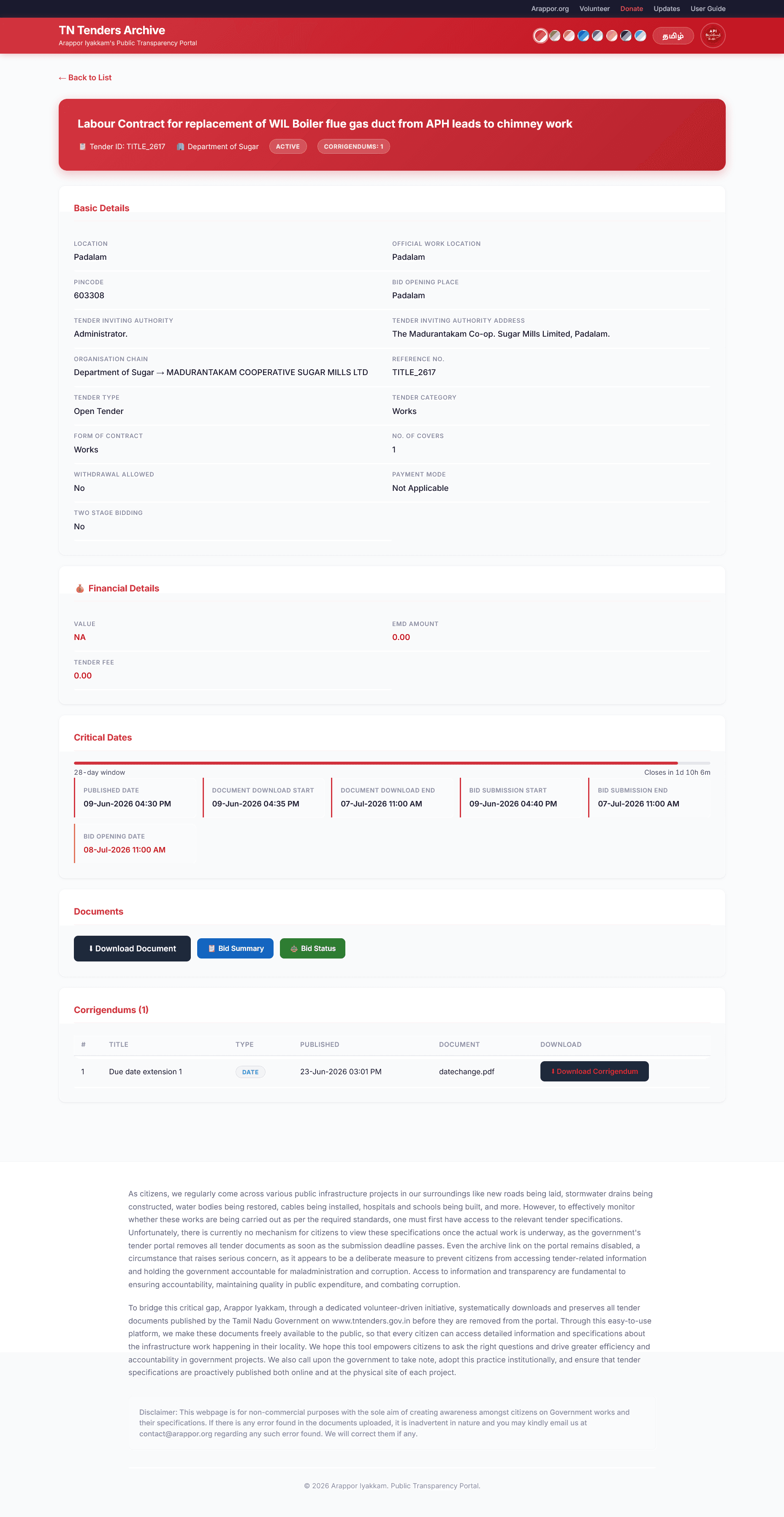
- 1Tender identity and status
Confirm the title, Tender ID, department, lifecycle status, and number of recorded corrigenda before reading the remaining fields.
- 2Basic details
Identify the authority, organisation chain, reference, location, procurement route, submission structure, and other captured source settings.
- 3Financial details
Read the captured estimated value, EMD, and tender fee with the NA and zero-value cautions explained below.
- 4Critical dates
Follow publication, document-download, submission, and opening dates, then check whether a later corrigendum changed them.
- 5Documents and bid evidence
Open the preserved document package and any captured government Bid Summary or Bid Status pages.
- 6Corrigenda
Review every recorded change notice in chronological order because later notices can override the original terms.
Tender identity and status
Begin here to confirm that you opened the intended procurement. The red heading area combines the tender title with its stable archive identifiers and a concise source-derived status summary.
- Tender title describes the advertised work, goods, or service. Similar titles can recur, so never use the title alone as the identifier.
- Tender ID is the portal identifier used throughout this archive. Include it when reporting an error or comparing the record with the government portal.
- Department names the procuring organisation stored for the tender; the organisation chain below gives the more detailed administrative hierarchy.
- Status and Corrigendums badges summarise the current stored state and the number of change notices recorded. A corrigendum count does not describe the importance of those changes.
Basic details
This section answers who invited the tender, where the work or supply is associated, and how the procurement is structured. Fields appear only to the extent that the source exposed and the archive captured them.
- Location is the general place associated with the tender; Official Work Location is the source's designated place of performance. They can be identical or different.
- Pincode helps identify the geographical area but should not be treated as a precise project coordinate.
- Bid Opening Place tells bidders where the authority states bids will be opened; it is not necessarily the work location.
- Tender Inviting Authority identifies the official or office that issued the tender, while its address records the available contact location.
- Organisation Chain shows the administrative path from the department to the procuring unit and is useful when similarly named offices issue tenders.
- Reference No. is the procuring authority's own reference. It can differ from the portal-generated Tender ID.
- Tender Type describes the procurement route, such as Open Tender or Limited Tender; eligibility still depends on the tender documents.
- Tender Category classifies the procurement as Works, Goods, or Services where the source provides that classification.
- Form of Contract records the source's contract format or classification. Read the tender package for the operative contractual terms.
- No. of Covers states how many electronic submission envelopes or stages the portal expects, not the number of files in the archive download.
- Withdrawal Allowed states whether the portal permits a submitted bid to be withdrawn under the source configuration.
- Payment Mode describes the configured tender-payment method. Not Applicable does not by itself prove that every fee or deposit is waived.
- Two Stage Bidding records whether the source identifies a two-stage process. It is distinct from a two-cover technical and financial submission.
Financial details
The page presents the estimated tender value, Earnest Money Deposit (EMD), and tender fee as stored. These are screening and orientation fields; the document package remains the authority for exemptions, taxes, schedules, and payment conditions.
- Value is the estimated tender or contract value captured from the source. It is not the final bid, award amount, or amount eventually paid.
- EMD Amount is the security deposit stated for bidding where captured. Eligibility-based exemptions may be explained only in the tender documents.
- Tender Fee is the fee value captured for obtaining or participating in the tender, where applicable.
- NA means the archive did not obtain a usable value. A displayed 0.00 is the stored numeric value and may reflect an explicit nil value or source normalisation; verify the tender documents before concluding that no payment was required.
Critical dates and tender window
This section places the source dates in sequence and shows the available bidding window. It helps readers spot deadlines and short-notice tenders, but the latest corrigendum can extend or replace an earlier date.
- Published Date is when the tender was recorded as published on the source portal.
- Document Download Start and End define the stated period for obtaining tender documents from the source portal.
- Bid Submission Start and End define the stated electronic submission window. The end date is the primary deadline used for lifecycle and notice calculations.
- Bid Opening Date is the scheduled opening time captured from the source. Actual evaluation, financial opening, and award may occur later.
- The Short Notice calculation counts exact calendar time from Published Date to Bid Submission End, using the stored Closing Date only when a usable submission deadline is unavailable.
- For enriched non-legacy tenders, a Short Notice warning is shown below 15 complete days when a known value is below Rs.10 crore or when value is missing, zero, or unusable. Exactly Rs.10 crore and higher values use the 30-day threshold. Even a one-hour shortfall is flagged; legacy tenders are not evaluated.
- Always compare these dates with every corrigendum. A later notice can extend the submission or opening date without changing the original display elsewhere.
Documents and bid-stage evidence
These actions connect the readable summary to preserved documents and available government bid-stage pages. Each button has a different evidentiary purpose and may not appear on every tender.
- Download Document opens the preserved tender package in Arappor's archive. Read its schedules, eligibility clauses, specifications, and forms for the complete requirements.
- Bid Summary opens the government portal's published summary of stages or bidders when that source link was captured.
- Bid Status opens the government technical or financial evaluation page when available. An admitted bidder is not automatically the winner.
- A missing or failed button means the corresponding link was not captured or is no longer reachable; it does not prove that the underlying page or evidence never existed.
Corrigenda and later changes
Corrigenda are official notices published after the original tender. They can make material changes, so a citizen should read them together with the original package before relying on any date, quantity, specification, or condition.
- The Corrigendums count at the top should match the number of change notices recorded in this table for the tender.
- Title briefly describes the change; Type is the archive's classification, such as a date change, document change, or other notice.
- Published records when the change notice appeared, while Document names the source file where that filename was available.
- Download Corrigendum opens the preserved notice. Read notices chronologically because the newest valid notice can supersede both the original tender and an earlier corrigendum.
- No listed corrigendum means none was captured for this record. It is not proof that the procuring authority never issued one; verify consequential use against the government source.
Know what every evidence action opens
Buttons appear only when the archive has the corresponding link. Government pages open outside Arappor and may fail after the portal removes a record or changes its session.
View Details
Opens the structured record inside this archive.
Usually available for current and legacy tenders.Use the documents for the full specification and conditions.Download
Opens the preserved tender package stored in Arappor's Google Drive archive.
Available only when a valid archive package and Drive link were recorded.This is an archived copy, not the live government page.Bid Summary
Opens the government portal's summary of published bid stages or participants.
Appears only when the source provides and the scraper captures the link.The page can remain incomplete until evaluation progresses.Bid Status
Opens the official technical or financial evaluation status page.
Most useful after bid opening and evaluation have started.Admitted does not itself mean winner; inspect financial ranking and AOC evidence.Government tender page
Opens the source TN Tenders portal record where still available.
Partial; the source may remove or expire older pages.A failed external link does not invalidate the archived documents.Corrigendum
Opens a later official change notice or replacement document.
Appears when the archive detects a published corrigendum.Always read it with the original tender because it can override earlier dates or conditions.Read the Updates page as a seven-day change register
The Updates page lists changes detected after a tender was first stored, including later dates, financial fields, document changes, status changes, and corrigenda. By default it covers today and the previous six India calendar dates. Every filter and count is calculated from the complete selected database period, while pagination keeps the page readable.
Date range and summary
The heading states the inclusive From and To dates and the total number of matching audit entries. Summary cards describe the complete selected scope, not merely the records visible on the current page.
- Today counts updates recorded on the current India calendar date within the selected search and department scope.
- Corrigenda counts recorded corrigendum-added events; Critical counts corrigenda, date changes, and financial changes.
- One tender can contribute several entries when several fields changed, so the update count is not a count of unique tenders.
Search, department, and dates
Filters are sent to the database and therefore examine every matching update in the selected period, including records beyond the first page.
- Search checks tender title, Tender ID, reference number, department, field name, old value, and new value.
- Department matches the stored procuring organisation exactly; its menu contains departments represented in the selected date range.
- From and To are inclusive calendar dates. Clear restores all filters and the default seven-day range.
Update categories
Category chips group audit entries by the changed field and recorded values. Their counts cover the selected search, department, and date scope.
- Corrigenda means a new corrigendum record was captured. Dates includes date, time, opening, submission, download-deadline, or extension changes.
- Financials includes value, amount, fee, EMD, cost, or estimate changes. Documents includes file or document changes not already classified as dates.
- Critical only is a screening shortcut: Corrigenda + Dates + Financials. It is not a finding of illegality or corruption.
Old and new evidence
Ordinary update cards show the stored value before and after the detected change. Corrigendum cards instead separate the available type, subject, publication date, and document name.
- Not recorded means the earlier or later audit value was empty; it does not establish that the government source omitted the information.
- Read field labels together with the tender documents because a short stored value may not contain the full context or units.
- For corrigenda, open the tender's Corrigenda section and read the preserved notice with the original package.
Tender links and pagination
Each card links back to the corresponding structured tender record. Pagination exposes every matching update without forcing the browser to download thousands of rows at once.
- View tender opens the structured record; a corrigendum update also links directly to the Corrigenda section.
- The page indicator and Showing range explain which slice of the complete result is visible.
- Per page can be set to 50, 100, or 200. Changing it or any filter returns the reader to page 1.
Responsible interpretation
An update proves that the archive recorded a difference between stored values or captured a later notice. It does not explain why the authority changed the tender or determine whether the change was proper.
- Compare the latest tender page, all corrigenda, and preserved documents before relying on an earlier value.
- Several entries at the same time can come from one refresh updating several fields on one tender.
- Use the Tender ID when reporting an apparent error so the archive record can be checked against the government source.
Legacy records contain a smaller set of fields
Legacy Archive records preserve historical discoverability, but they were imported from a more limited source. Availability is determined record by record.
| Feature availability | Current tenders | Legacy archive |
|---|---|---|
| Title, tender ID, reference number | Available | Generally available |
| Department / organisation | Available | Generally available |
| Publication and closing dates | Available | Partial; source precision can differ |
| Location and pincode | Available when disclosed | Usually unavailable |
| Tender type and category | Available when disclosed | Usually unavailable |
| Value, EMD, tender fee | Available when disclosed | Partial or unavailable |
| Archived document package | Usually available | Partial |
| Corrigenda, Bid Summary, Bid Status | Available when published | Usually unavailable |
| Short Notice badge | Available when publication and deadline dates are usable; unavailable value uses the 15-day baseline | Not evaluated or labelled |
Treat signals as questions, not verdicts
- 1
Short Notice and Updated labels tell you where to look more closely; they do not establish illegality or corruption.
- 2
Finalized means the bidding deadline passed. It does not establish the winner, contract award, payment, or completion.
- 3
A blank value or missing button can mean the source did not publish it, the page expired, or the scraper could not capture it.
- 4
For public allegations, legal action, or financial decisions, verify the latest government record, corrigenda, bid evidence, and award documents.
Questions
Why can I not find a tender published today?
Collection, checking, document archiving, and publication can take approximately one to two days. Search again using its ID or reference number after that period.
Why is a value shown as NA?
NA means the archive did not obtain a usable value for that field. It does not automatically mean the government tender omitted it; inspect the document package.
Why can a tender with an NA value show Short Notice?
For an enriched non-legacy tender with usable publication and deadline dates, a missing, zero, or unusable value uses the 15-day baseline. The badge means the exact available window was under 15 complete days; it does not claim that the tender value was below Rs.10 crore. Legacy tenders are not evaluated.
Why is a button missing?
Buttons are shown only when a corresponding link was captured. Bid-stage links may appear later, and many legacy records never contained them.
Why does a government link fail?
The TN Tenders portal may remove old pages, expire sessions, or change links. Try the archived Download package and the structured detail page.
Where can I report an error?
Email contact@arappor.org with the tender ID, the incorrect field or link, and the source evidence you used to verify it.